


Free Antivirus for Mac
Best Mac antivirus with free VPN and password manager included
- Award-winning antivirus – blocks and removes all malware
- Real-Time-Protection – safely shop, browse, and download
- Private – protects your data with encrypted VPN

GET FREE ANTIVIRUS ON ALL YOUR DEVICES
Downloaded by millions.
And awarded by leading testing institutes for its security, performance, and usability.

Macs also need protection
With an ever increasing number of threats detected on macOS, it's time you equipped yourself with proper defenses.
Avira Free Security protects you from millions of threats, including ransomware, spyware, and adware.

Fast and light
Avira Free Security doesn’t slow you down nor drain your system’s resources.
Avira's engine is one of the fastest and most efficient in the industry - and as Free Security is newly built on native Mac technology, it's fully optimised and runs smoothly on macOS.
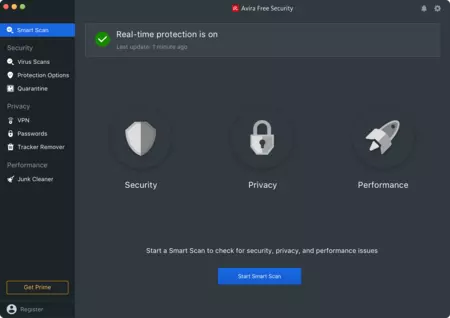
Powerful Antivirus Scan
Avira Free Security’s Smart Scan detects security, privacy and performance issues on your Mac all at once – with just one click.
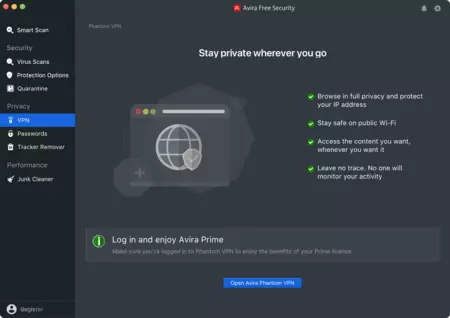
So much more than antivirus
Avira Free Security also includes a range of privacy and performance tools, including a free VPN (500 MB/month for free), a Password Manager, and a junk file cleaner.
Take our product tour
Click on the features to discover Avira Free Security for Mac.

Your antivirus protection is ON
Last Update: 1 hour ago

Security

Privacy

Performance
Start a Smart Scan to check for security, privacy and performance issues
Activity
See what Avira Security has done for you
Today
You got the latest version of Avira Security (version 1.5.1)
Virus Scans
Scan your devices for threats

Quick scan
Scan the most vulnerable areas of your device

Full scan
Scan your entire device for viruses

Custom scan
Choose or drop here what you want to scan
Protection Options
Choose your core barriers against viruses
Real-time Protection
Check every new file for threats

Quarantine
All threats are safely contained here

Virus Scans
Scan your device for threats

Quick Scan
Scan the most vulnerable areas

Full Scan
Check your entire device for viruses
Phantom VPN
Stay private wherever you go

- Browse in full privacy, and protect your IP address
- Stay safe on public Wi-Fi
- Access the content you want, whenever you want it
- Leave no trace. No one will monitor your activity
Password Manager
Remember only a master password

- Access all your websites and apps with just one master password
- Create strong and unique passwords for your accounts
- Sync your passwords on all your devices
Track Remover
Clean your Mac from trackers

- Delete all your advertising trackers
- Stop websites from following your behaviour
- Clean up your browsing digital footprint
Get Prime to remove your trackers
Junk Cleaner
Curious how much space you can clean?

- Safely delete unneeded files with one click
- Get rid of files that take up space
- Fine-tune your Mac's performance
Free Security
Activity
See what Avira Security has done for you
Today
A Smart Scan was done on your device
You got the latest version of Avira Security (version 1.5.1)
Free Security
Scheduler
Schedule your scans at your convenience
Smart scan
Routine Smart Scan
Starts the 13th of every month at 12:00Virus scans
Routine Quick Scan
Starts every Tuesday at 00:00Free Security
Uninstaller
Remove apps and all their related files

- Uninstall applications correctly
- Clean leftovers from uninstalled apps
- Remove widgets and browser extensions easily
Get Prime to uninstall apps properly
Easily switch between dark & light modes
Avira integrates smoothly into your environment and provides an intuitive user experience.

Private by design: We don't sell your data.
Unlike most security vendors, Avira doesn't sell your data and never will. Nor do we share your data with 3rd parties such as government, Big Tech or advertising networks.


System requirements
Get the best free Antivirus for Mac now
The Avira Antivirus for Mac software is our simple and elegant solution for your online security. Easy to use, the Mac virus scan starts with just the push of a button. Your Mac is protected from online threats such as Trojans, viruses, adware, and spyware by our award-winning technology and easy-to-use interface. The Activity Stream displays all security-related information in real-time, showing constantly-updated protection. Our Apple virus scan works silently in the background and won’t slow down your system – carry on working without worrying about online threats.
Simple and effective: The Avira Antivirus for Mac
Your Mac also needs protection, and our Antivirus for Mac blocks thousands of threats each day.
Real-time protection means that your Mac is secure against malicious attack. Put up strong a defense against ransomware that encrypts your private data, spyware that steals your information, and adware that spams you with unwanted ads.
- Schedule security scans so that they run unobtrusively in the background and update your virus definition database automatically. Your free Antivirus software updates in real-time so you are always protected.
- Check your Activity Stream and see at a glance all the security-related activities on your Mac, including blocked threats.
- Unknown files are uploaded to our Protection Cloud and analyzed by AI technology. All our clients profit from protection in real-time. If a new threat is detected, all your devices are protected within minutes.
- The System Scanner means that you can search for known viruses whenever you wish by, for example, running a scan of the content of your USB drives.
- Suspicious files are safely quarantined. Open the Quarantine Management Manager to review these.
- The Avira Browser Safety tool blocks annoying banners on websites, and also protects you from infected sites and phishing attacks. Do what you need to do and browse your chosen content without the interruption of pop-ups. The tool checks for hidden links in social networks and in emails, to stop cybercriminals gaining access to your system.
Get the best free virus scan for Mac
Macs get attacked by cybercriminals trying to encrypt or steal your personal data. Or they might try to use your system as part of a botnet to attack other computers globally. Our Mac OS antivirus software offers the best Mac virus removal and protects your system. Scan your system at the push of a button and repair folders with just one click. Our Apple virus scan software is free. Download it now for your Mac with macOS 10.15 (Catalina) and later versions! For additional features get our Free Security Suite, including free Antivirus for Mac, free Phantom VPN to secure and anonymize your online surfing, Avira Browser Safety (on Firefox) to block ads and browser trackers. For premium antivirus protection, discover the benefits of our Antivirus Pro for Mac now.
Although Macs are considered less vulnerable to malware than Windows devices, they are not totally invulnerable. The independent research institute AV-Test has recorded a significant increase in macOS malware and PUAs (potentially unwanted applications) in recent years. Free antivirus software such as Avira Free Antivirus for Mac helps you better protect your device against malware such as viruses, Trojans, spyware, and ransomware. That’s because Avira’s antivirus tool receives more frequent virus definition updates than macOS's built-in antivirus, enabling Avira’s solution to detect even the latest threats.
In addition, you can use the free Avira Browser Safety add-on to ensure that PUAs, such as annoying adware, do not get onto your Mac in the first place. Avira Browser Protection helps you detect PUAs like adware hidden in software downloads and offers you a safe download alternative. In addition, you can also block harmful ads and websites, unsafe and phishing websites, online tracking, and prevent browser hijacking.
Avira Free Antivirus for Mac not only helps you better protect your device from malware such as viruses, Trojans, spyware, and ransomware but also includes many other security, online privacy, and optimization features alongside virus protection. Thanks to the integrated VPN, you can enjoy bank-grade security to surf anonymously and encrypt your traffic even on unsecured public Wi-Fi hotspots. The password manager helps you create strong passwords for your user accounts, while the junk cleaner rids your Mac of junk data and duplicate files. The Avira Browser Safety add-on helps you block harmful ads and websites, unsafe and phishing websites, online tracking, and prevent browser hijacking. All these features mean Avira solutions are the perfect complement to the security features built into macOS, providing additional layers of protection.