


From our best comments
Avira System Speedup - The top Optimizer for Windows

The most comprehensive PC cleaner available
- Maximizes performance with a faster PC
- Automatically cleans junk & clutter
- Includes 40 premium optimization tools
Optimizing your PC never looked so good


Keep your device clean and lean
Too much data junk on your PC? Monster files taking up all the space?
Over time, your hard drive becomes cluttered. System Speedup scans your PC for all the stuff it no longer needs – system cache, temp files, internet junk, and unnecessary user data. It then removes it all, cleaning your PC and freeing up disk space in the process. It identifies all the inefficiencies holding you back. Clean the junk with one click or set to automatic weekly cleaning.

Reach peak PC performance
Too many programs trying to run automatically can really slow you down. Avira System Speedup Pro automatically boosts performance and reduces lags. For improved overall performance, it tunes and defragments your disk. And Startup Optimizer significantly shortens your boot up time. The Realtime Optimizer improves your user experience by giving more power to things that matter for you.
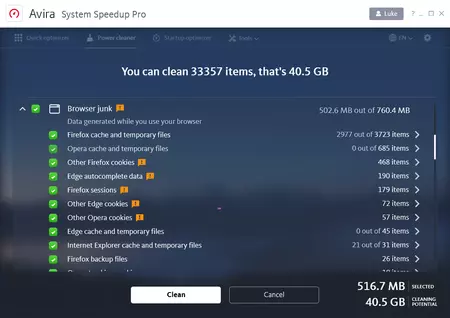
Increase your privacy and clean digital traces from your browser
There’s some stuff browsers can’t delete by themselves. System Speedup removes all digital traces and temporary data from every browser, and then optimizes the browser database to keep your disk clean. Pages load faster, videos stream smoother and your online experience is altogether better.
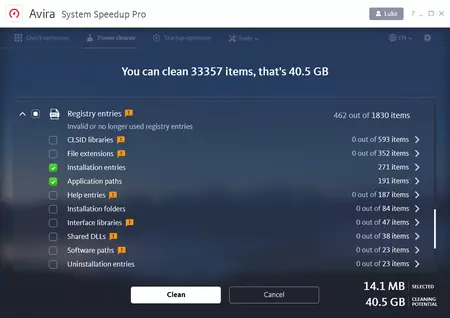
Clean your registry
Your registry is a critical behind-the-scenes player on every Windows machine. But over time, invalid registry entries or leftovers from uninstalled software pile up and cause crashes, freezing and other errors. System Speedup Pro has a powerful deep registry analysis feature, analyzing and cleaning up any registry problems you have.
Relax with automatic optimization
If thinking about disk cleaning and optimization gives you a headache, just use System Speedup’s real-time monitoring software for a reminder to clean your machine. No need to manually clean your machine – just set a target (e.g. 3 GB of junk files), and every time the limit is reached, OnWatch automatically cleans your PC for you. You can customize the alerts to suit your PC.
Cut out the crashes
Sick of always crashing and freezing? Blame outdated drivers, clogged registries and a host of other nasties. System Speedup Pro gives you the toolbox you need to tinker with your PC settings to your heart’s content. Clean, defrag, monitor, maintain – and make frequent crashes a thing of the past.
Keep your personal data secure
Disk Wiper
Make sure your disk is permanently wiped and can’t be recovered later on
File Shredder
Erase confidential files permanently, with no chance of recovery
Encrypt your files
Keep personal, private and confidential data safe with full encryption and decryption capabilities

Free up gaming resources
Channel all resources to your gaming by disabling unnecessary processes running in the background. The end result? Smoother gaming for a more enjoyable experience.

Create a virtual gaming hard drive
Accelerate load times by defragging game folders and creating a dedicated gaming area in the RAM. And when you’re done, your PC gets reset to its original pre-gaming state.
Avira has more than 35 years of online security experience
System Requirements

Not ready to commit?
Get FREE 30-day access to all our Premium products!
No credit card required.
By proceeding, you are accepting the End User License Agreement (EULA) and the Terms and Conditions. You can find our Privacy Policy here: https://www.avira.com/en/privacy-policy/homepage.
