A hacked PayPal account can cause a lot of stress, especially when unauthorised debits hit your bank account. But with quick action, you can secure your account, minimise losses and avoid future attacks. Here you can find out how to take back control after a hacker attack – and protect yourself better in future. One effective measure, for example, is to use a password manager such as Avira Password Manager, which helps you to create and manage secure and unique passwords to prevent unauthorised account access.
Immediate measures for a hacked PayPal account
If your PayPal account has been hacked, every minute counts: Hackers could make unauthorised transactions or access personal data. Acting quickly minimises damage and helps you regain control of your account.
Reset your password
As soon as you suspect that unauthorised access has occurred, reset your password.
Click on “Forgot password” on the login page. You will then be offered various options to verify your identity.
You will then be prompted to create a new password. Use a strong password that includes a combination of letters, numbers, and special characters.
A password manager can help you generate and store secure, unique passwords.
Use a passkey
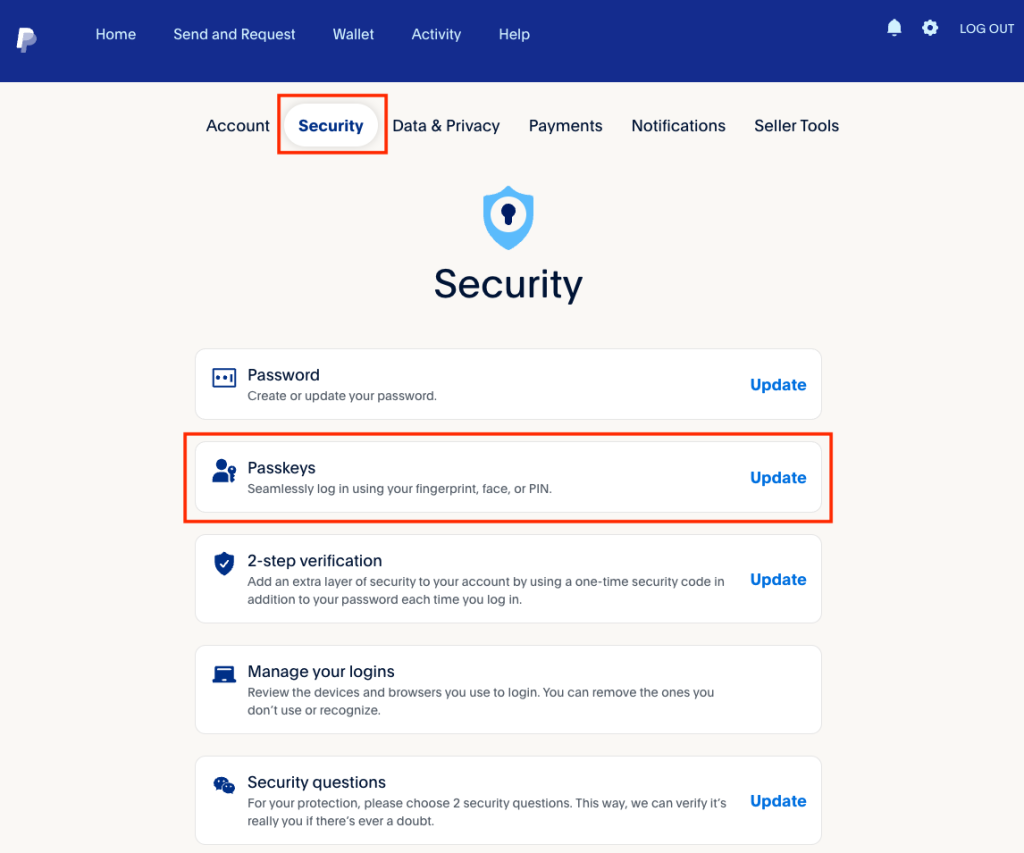
Passkeys are a modern alternative to passwords. They allow secure logins without a password by using your face, fingerprint, or a PIN to unlock your account.
You might already be familiar with passkeys from your laptop or mobile phone. They work only on devices you’ve authorised. This ensures that even if hackers gain access to your data, they cannot access your account.
How do I set up a passkey on PayPal?
- Log in to your PayPal account.
- Navigate to your account settings and look for the Security
- Enable the passkey option and follow the instructions provided.
Using a passkey is particularly secure because you don’t need to enter passwords that could be stolen through phishing.
However, still choose a strong password to protect yourself from hackers when accessing your PayPal account from devices other than your own.
Set up two-factor authentication
One of the most effective measures against hacking is two-factor authentication. With this, an additional security code is required for each login, which attackers typically cannot access.
Enable this feature immediately if it hasn’t been set up yet.
Add security questions
In addition to two-factor authentication, you can set up security questions in your PayPal settings. These provide extra protection, as only you know the answers. Choose questions and answers that are not easy to guess.
Even though security questions may seem somewhat outdated, they are important for verifying your identity with PayPal Support in case of an emergency.
This also gives you a chance to recover your account if you fall victim to account hijacking.
A particularly severe case occurs if your email account is hacked. This allows fraudsters to use the “Reset Password” function on PayPal to request a new password.
Check and report transactions
Regularly check your account for suspicious activities, such as unauthorised withdrawals. Many cases of PayPal fraud begin with small test payments that later lead to larger losses. Report such transactions immediately.
Contact PayPal support
Report the incident immediately to PayPal customer service. PayPal investigates reported unauthorised transactions within 10 business days and often reimburses the stolen money.
Here’s how it works:
- Log in to your PayPal account and click on Help.
- Scroll down and select the Resolution Centre
- You’ll be directed to your activity overview.
- Select the problematic transaction and follow the instructions.
In the help section, you’ll also find the option to call PayPal support. You’ll receive a one-time customer service PIN, which expires after ten minutes.
How do I know if my PayPal account has been hacked?
A hacked account often shows clear signs:
- You receive emails about account changes you did not make.
- There are unauthorised withdrawals in your PayPal account.
- You lose access because your password has been changed.
Another sign is the use of unfamiliar devices on your account. PayPal will notify you of new logins – make sure to carefully check these notifications.
Ensure that the notification email genuinely comes from an official PayPal address. Do not click on links in suspicious emails. Instead, log in directly to your PayPal account to check for unusual changes.
How hackers take over PayPal accounts
Hackers often take over PayPal accounts through phishing. They use fake emails or websites to deceive users and steal login details. These fakes look increasingly convincing today.
To avoid phishing, carefully examine the email sender. In most cases, the email address will reveal that the message did not come from PayPal.
Additional tips:
- PayPal always addresses you by your first and last name.
- PayPal never asks for personal information.
- PayPal does not send emails with attachments.
- PayPal does not link to websites other than its own.
To avoid fake websites, always go directly to paypal.com and log in there. PayPal always uses secure HTTPS connections.
If an email or website seems suspicious, send it to phishing@paypal.com.
Malware—harmful software that can enter your device through insecure downloads—can also spy on passwords or even give criminals direct access to your account.
Also, avoid logging into your PayPal account while connected to public Wi-Fi networks. These networks are often insecure due to the lack of user authorisation, making it easy for attackers to intercept sensitive data.
What steps does PayPal take in the event of a hacking incident?
PayPal has clear guidelines for handling hacked accounts. When you report unauthorised transactions, the company often freezes your account immediately to prevent further damage.
In many cases, withdrawn funds are refunded, provided the incident is reported promptly.
If you suspect that hackers have accessed your bank details via PayPal, contact your bank directly. While PayPal does not share your bank details, fraudulent payments could still cause damage.
Also, report the incident to the relevant authorities – especially in cases of significant financial loss.
How can I protect my PayPal account from hackers?
A hacked PayPal account is a serious matter, but with the right measures, you can limit the damage and prevent future attacks.
Use a combination of strong passwords, two-factor authentication, and an online security solution like Avira Free Security, which provides comprehensive protection against malware and other cyberattacks.
Never use the same password for multiple accounts and change your login details regularly. The password manager integrated into Avira Free Security allows you to easily create and manage complex passwords.
Stay vigilant and regularly inform yourself about current scams – this will help minimise the risk of falling victim to a hacker attack.
PayPal is a trademark of PAYPAL, INC.