

Many people love Google Chrome because it’s fast, easy to use, and works seamlessly with all their favourite Google services, like Gmail and YouTube. Add features like cross-device syncing, and it’s simple to see why it’s often a go-to choice. If your device didn’t come with Chrome as the default option, you’ve come to the right place: Follow this guide to make Google Chrome your default browser on Windows, Mac, Android, and iOS. And don’t forget to add free Avira Secure Browsing to help block online threats, trackers, and ads.
Love Chrome? Here’s how to make it your default browser on all your devices
Whether you’re watching cat videos at home or need Google Chrome for serious work, there are many advantages to setting it as your default browser. Any link you click on will automatically open in Chrome, for example (no need for tedious copying and pasting). Have you decided it helps offer a lightning-fast browsing experience, even on JavaScript-heavy websites? Do you need easy access to bookmarks and browsing history, or are you a YouTube addict and a regular user of Google Workspace? Whatever your reasons for needing instant Chrome access, find your fix below.
How to set Google Chrome as your default browser on Windows 10
Here are the steps to make Chrome your primary browser if you still use Windows 10.
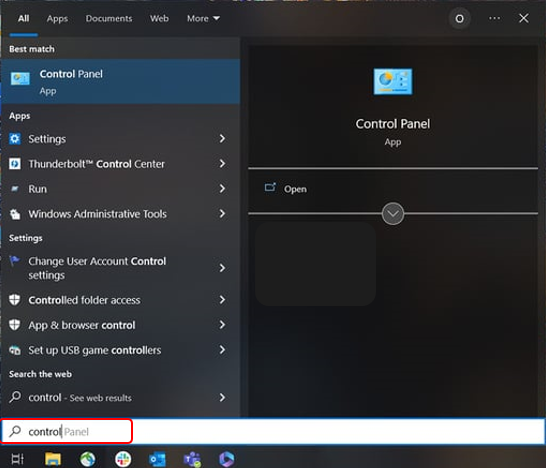
- In the Windows Start menu search box, type Control Panel and hit Enter.
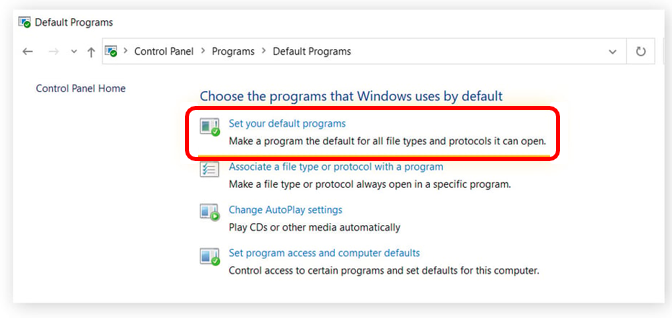
- Click on Programs. Then select Default Programs and choose Set your default programs.
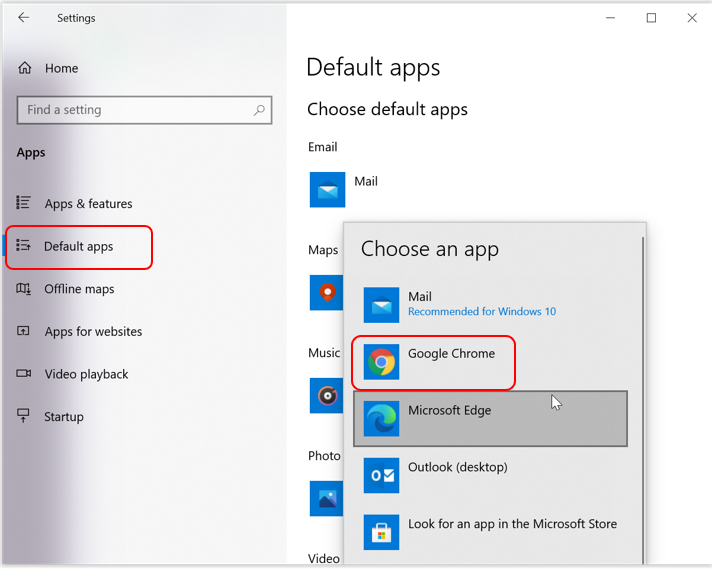
- A list of default apps now appears. Click on Web browser and select Google Chrome from the pop-up menu.


How to set Google Chrome as your default browser on Windows 11
Follow these steps if your PC has a Windows 11 operating system.
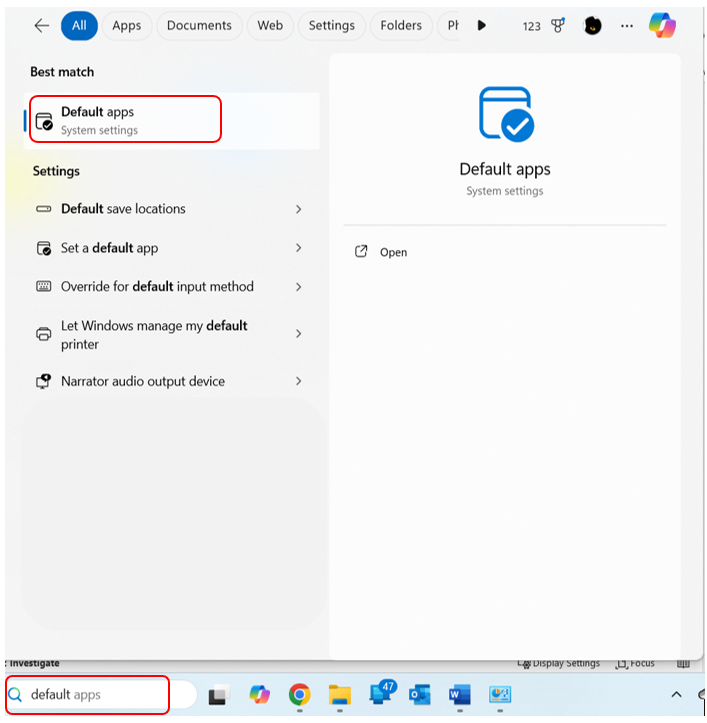
- Start typing Default apps in the search box next to the Windows icon. When this System Settings app appears, click on it.
- In the search bar under Set defaults for applications, type Google Chrome.
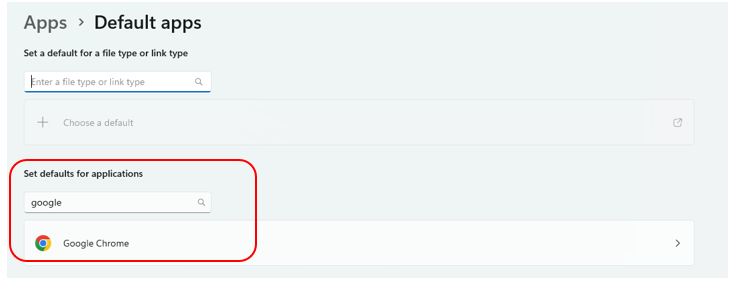
- Select Google Chrome and click the Set default button so a tick appears.



How to set Google Chrome as your default browser on Mac
Safari is the set default browser for Mac operating systems. It’s easy to download Google Chrome from the Google Play app store if you haven’t already done so. Then, choose from one of the following two simple methods to set Chrome as your internet browser.
Method 1
- Open Google Chrome.
- Click on the three vertical dotsin the upper right-hand corner, and the menu opens.
- Select Settingsfrom the list.
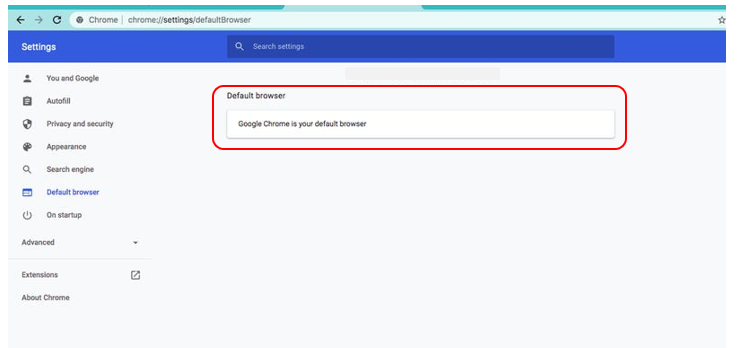
- In the menu on the left, click Default browser.

Method 2
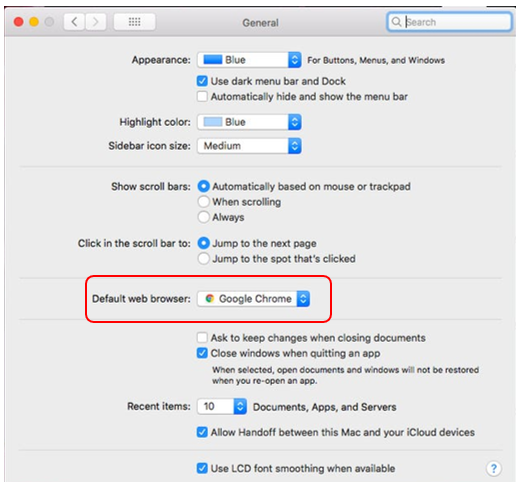
- On the desktop screen, select the Apple icon in the upper left-hand corner.
- Choose System Preferencesin the menu.
- Select General from the options listed.
- Next to the Default web browser, choose Google Chromefrom the pop-up list. Then, close the window.

Now that you’ve changed your default browser to Chrome on either your PC or Mac, adding a security and privacy extension like Avira Secure Browser is a good idea. It can block dangerous websites from loading and helps you better control your privacy online by helping block ads, minimise web tracking, and helping to stop browser fingerprinting.
Set Google Chrome as your default browser on Android
If you’re an Android user, the joy of Google Chrome is just a few clicks away.
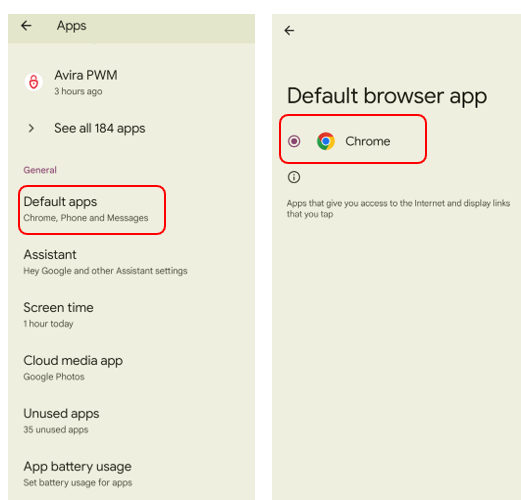
- Open Settings and tap Apps.
- Choose Default apps.
- Select the Browser appand pick Chrome.

Set Google Chrome as your default browser on iOS
Apple phone fan? Here’s a quick guide to setting Chrome as your default browse on an iPhone or iPad (for Apple devices using iOS 14 or newer).
- Go to Settings and find the list of installed apps.
- Choose Chrome.
- Select Default Browser App and pick Chrome.
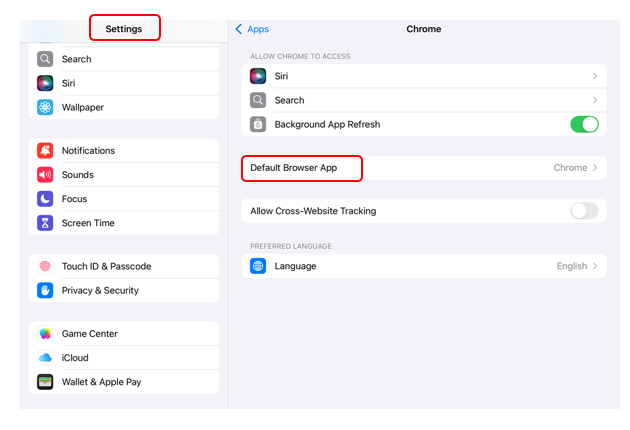

Remember that, despite their smaller size, mobile devices are still a big target for cybercriminals and are at constant risk of malware like viruses and ransomware. Online security solutions like free Avira Antivirus Security for Android and Avira Free Mobile Security for iOS are essential for helping to shield your privacy and helping to protect you against online threats. And it goes without saying that every computer needs reputable online security. For multiple layers of defence (and a free VPN), consider Avira Free Security for Windows PCs and Avira Free Antivirus for Mac.
Mission accomplished? Verify that Google Chrome is your default browser
You can check if Google Chrome is your default browser by looking for the “Make default” button in your device’s settings. If Chrome is already your default browser, you usually won’t see the button. You can also verify your settings in Google Chrome itself:
- Open Chrome
- Click the three vertical dots in the top right corner.
- Click Settings.
- Scroll down and select Default browser.
- You’ll see the notification: “Google Chrome is your default browser”.
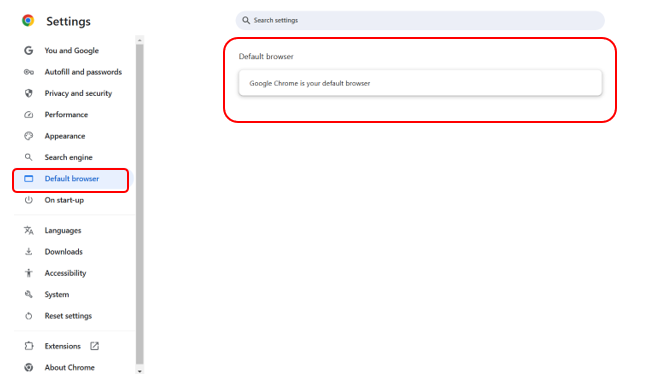

Now you can be confident that Google Chrome is your device’s automatic choice, so happy surfing! Remember that many factors will influence browser speed, such as heavy traffic, the website’s complexity and even the website server’s location. Find out more about browser speeds, including which is the quickest at zooming along online highways: Don’t miss our blog on the fastest web browsers. You can also give your computer and browser a helping hand with routine maintenance like clearing your browser cache.
The primary factor behind your internet speed is your internet service provider (ISP) and their technology. DSL? Cable? Fibre? If you’re feeling more tortoise than hare, you’ll need to explore why your internet is slow.
What are the benefits of using Google Chrome as your default browser?
Setting Google Chrome as your default browser has several advantages, thanks to its features, performance, and ecosystem compatibility. Here’s what its fans tend to appreciate:
- Speed and performance: Chrome offers a fast browsing experience, including quick page loads, efficient rendering, and smooth performance. It should also take JavaScript-heavy websites and web applications in its stride, so it’s useful as our browsing needs become more demanding.
- Cross-device synchronisation and a user-friendly interface: Whether on a PC, smartphone or tablet, you should be able to seamlessly access your Google account wherever you go—and you’ll take your bookmarks, browsing history, passwords, and settings with you. Users of all levels tend to find the interface simple and intuitive to navigate. It’s convenient too—Chrome’s Omnibox (address bar) also acts as a search bar and can give you quick answers to calculations, weather updates, and more.
- A wide range of extensions and customisation options: The Chrome Web Store offers thousands of extensions for productivity, entertainment, privacy, and more, so you’ll likely find what you’re looking for to better meet your needs. You can also choose from various themes and personalised settings and tailor the start page to suit you.
- High level of compatibility and integration: Chrome is so widely used that most websites and web apps are optimised for it. And, of course, it’s designed to play nicely with other Google platforms like Google Workspace (Docs, Drive, Gmail). Chrome integrates easily with services like YouTube and Google Translate as part of the Google ecosystem. And with specific features like Google Docs Offline, Chrome allows offline access to content.
- Regular updates and security: Chrome receives frequent updates for security patches and performance improvements. Google Chrome Help is a valuable online resource for learning about updating Google Chrome and managing Chrome safety and security.
Help protect your browsing with this free extension for Google Chrome
From fake websites laced with malware to dodgy downloads and hackers eager to hoover up your personal details…online oceans are swimming with dangers. A browser extension like Avira Secure Browser is an extra online lifeguard: It helps block malicious and phishing websites and infected downloads, so you’re not even tempted to click on them. It also tries to steer you clear of websites that don’t use the more secure HTTPS encryption.
Do you know that many websites, advertisers, and sales analysis companies track your online activities? That’s why Avira Secure Browser has anti-tracking powers, a private mode (stops your browsing history from being saved) and a privacy cleaner (to delete the data stored in your browser). It’s like surfing in incognito mode but with more comprehensive protections.
Google and Chrome are trademarks of Google LLC.