

For most of us, WhatsApp has become an indispensable part of life. That makes it all the worse if your WhatsApp account gets hacked and someone gains access to it without your permission. Read on to learn how to tell if your WhatsApp account’s been hacked and what you can do if it has. You’ll also discover what steps you can take to protect your account and find out how you can use Avira Antivirus Security for Android or Avira Mobile Security for iOS to shield your smartphone from hacker attacks.
Can WhatsApp get hacked?
WhatsApp is one of the planet’s most popular messaging services with around 3 billion active users around the world and over 150 billion messages sent daily. Thanks to its end-to-end encryption and other security features, it’s also considered quite safe. But despite all that, WhatsApp accounts can still be hacked or taken over.
Generally speaking, a WhatsApp hack refers to someone gaining unauthorized access to another person’s WhatsApp account — most often through social engineering techniques (sometimes called human hacking). By contrast, a traditional hacking attack involves bypassing the technical safeguards or exploiting vulnerabilities — although thankfully this is relatively rare thanks to the platform’s robust security mechanisms.
Unlike many other accounts, you can’t log in to a WhatsApp account using login details such as a username and password. Instead, it’s linked to your phone number and can only ever be registered with that one number on one primary device. Attackers therefore don’t target login data but mostly focus on authentication factors such as verification codes, which are used to confirm a number. You can find out exactly how the attackers achieve this further down in this article.
In principle, there are two ways cybercriminals can gain access to your WhatsApp account.
- The attacker links a new device to your WhatsApp account. In this case, you can continue using WhatsApp, but the attacker also has access — including to current chats.
- The attacker registers your phone number on their device. Your WhatsApp account will then be activated there and you’ll be logged out automatically on your device. However, the attacker cannot access old messages because they’re stored on your device.
How can you tell if your WhatsApp account has been hacked?
Thankfully, there are many telltale signs if it has:
Something unusual is going on with your account.
- You receive WhatsApp messages from people you don’t know.
- Your own contacts are no longer in your contact list.
- You’ll see sent messages that you didn’t write and/or receive replies to them.
- Your contacts tell you that they’re receiving odd messages or spam from you.
- Your profile picture, name, or account description has changed.
- Your status shows content you didn’t post.
- You see chats you never sent and groups you never joined.
In this scenario, someone has probably linked their device to your account. The good news is that you can simply log them out as described in the next section.
You receive a verification code by text message, but you didn’t request one.
If you receive a verification code from WhatsApp via text or voice message without having requested one, someone might be attempting to take over your account. That’s because such a code is only ever required if someone tries to register a WhatsApp account with your phone number on a new primary device. However, there could also be a harmless reason behind it — for example, if another user simply entered their number incorrectly and accidentally used yours.
. Without this six-digit code, however, nobody but you can complete the registration process. As such, never respond to such notifications and never share the code.
You see linked devices you don’t recognize.
If unknown devices are linked to your WhatsApp account, it’s probably been hacked. However, devices cannot be linked to your WhatsApp account without you initiating the process — such as when you use your logged-in primary device to scan a QR code on a new device or confirm a numeric pairing code in the app.
Here’s how to check your account for unknown devices and log them out:
- Open WhatsApp on your smartphone.
- Go to the Settings menu (on an Android smartphone, tap the three dots in the top right corner; on an iPhone, tap the You icon in the bottom right corner) and then tap Linked devices.
- If you see devices that you don’t recognize, it’s a sure sign that your WhatsApp account has been hacked.
- Delete these linked devices straight away by tapping each device and selecting Log out.
You’ve been logged out of your account.
If, after opening WhatsApp, you see the message “Your phone number is no longer registered with WhatsApp on this phone.” and you haven’t logged in on a new primary device or reinstalled WhatsApp, someone has gained access to your account. In this case, proceed as described in the next section to restore your account.
Follow these steps if your WhatsApp account’s been hacked
Recover your hacked WhatsApp account.
You can only recover your WhatsApp account if you still have access to a SIM card with the same phone number as your account. If someone gains unauthorized access to your account, they’ll be logged out automatically once you recover your account. That’s because re-registering using your six-digit verification code disconnects all other devices logged in to your WhatsApp account. Here’s what to do:
- Tap Log back in followed by Continue.
- Enter your phone number and then tap Next followed by OK.
- Enter the six-digit code you received by text message or phone call.
- If you’ve turned on two-step verification, you’ll be prompted to enter your PIN.
- WhatsApp may offer to restore your chats and settings from a backup on iCloud, Google Drive, or a local storage device.
- Once you’ve restored your account, you should turn on additional security features to strengthen the protection of your WhatsApp account. We’ll go into greater detail on those points at the end of this article.
If you haven’t turned on two-step verification and you’re asked for a PIN when recovering your account, it’s a sign that an attacker who’s using your account has turned it on to lock you out. If you’ve registered and verified your email address in your WhatsApp account, you can tap Forgot PIN? and then on Send email to receive an email with a link to reset your PIN.
If not, your WhatsApp account will be blocked for seven days. After that, you can then reset your PIN and regain access to your account via Forgot PIN? and Reset account. During the seven-day waiting period, no one can access your account. It begins from the time your account was last connected to WhatsApp.
Contact your mobile network operator.
Should you fall victim to a SIM swap scam (see next section) and you can no longer access your phone number, contact your mobile network operator and report the incident. Once you’ve verified your identity, the compromised SIM card can be deactivated and you’ll be issued a new SIM card with your existing phone number. You’ll then be able to log back in to WhatsApp and regain full access to your account.
Report the hack to WhatsApp.
You can inform WhatsApp that your account has been hacked or taken over.
- Using the contact form: https://www.whatsapp.com/contact
- By email: support@whatsapp.com (no officially designated route)
- By WhatsApp chat: If you can still access your account, select Help and feedback in the settings menu, followed by Help Center. Tap Contact us at the very bottom, start a chat with WhatsApp support, and report the incident.
However, be aware that contrary to what some articles suggest, WhatsApp can’t help you if you no longer have access to your phone number. In such cases, WhatsApp is unable to disable or delete your account for you as it can’t verify that you are the rightful owner of the phone number linked to the account. WhatsApp is also unable to determine who tried to take over your account or when, where, and by whom it was accessed.
Inform your contacts.
If you suspect that someone else is using your WhatsApp account, inform your family and friends such as via your WhatsApp account description, your WhatsApp status, or other social networks if you no longer have access to your WhatsApp account. That’s because the attackers could pose as you and message your contacts, claiming that you’re in trouble to get money or defraud them in other ways.
Check your phone for malware.
If you suspect that your WhatsApp account has been compromised as a result of malware, use a virus scanner like Avira Antivirus Security for Android to detect and remove it.
How can cybercriminals hack your WhatsApp account?
Cybercriminals use various techniques to gain access to a WhatsApp account. If they succeed, they can harvest confidential information and details, impersonate you and message your contacts to ask for money, or carry out other scams or send spam.
Intercepting the verification code
In most cases, cybercriminals try to get their hands on verification codes. To do this, they attempt to register with WhatsApp on their device using a phone number that doesn’t belong to them. This triggers a verification code to be sent to the legitimate owner of the phone number, which they then try to obtain to complete the registration process by sending a phishing message to the owner.
They often pretend to be a member of the WhatsApp support team, claiming that a verification code has just been sent due to suspicious account activity — or something similar. The user is asked to pass on this code or enter it on a fake website to prevent their account from allegedly being suspended. Once the scammers have the code, they can take over the WhatsApp account.
Spyware and malware
Scammers can also compromise a WhatsApp account using spyware or other similar malware to infect the victim’s smartphone. Malware usually gets installed on a device via manipulated apps, infected file attachments, or malicious links. Once the malware is active, it can record keystrokes, read screen content, or intercept text messages. This allows attackers to even view messages containing WhatsApp verification codes and then take over the account.
SIM swapping
Here, scammers harvest as much personal data as possible from a victim to pose as the legitimate contract holder to the mobile network operator. Scammers arrange for a new SIM card with the victim’s phone number to be activated under the pretext that their supposed phone has been lost or stolen. This deactivates the old SIM card and allows the scammers to register with WhatsApp since the verification code is sent to the compromised number.
Ghost pairing attacks
In this scam, the scammer uses the official function in WhatsApp Web to link their device. To do this, the scammer lures the victim to a fake website and gets them to “verify” themselves using their phone number. Using this number, the attacker starts the linking function on their own device, resulting in WhatsApp generating an eight-digit pairing code. This code is displayed to the victim via the fake website, and they’re asked to enter it into WhatsApp.
In rarer cases, the link is established via a QR code rather than a telephone number and numeric code. In this scenario, the QR code is generated on the attacker’s device and must be scanned by the victim using their cell phone. In both cases, the scammers gain access to the account without logging the victim out, so they may not notice at first that the hacker has access.
How to protect yourself from WhatsApp hacker attacks
Fortunately, there are ways to protect and prevent your WhatsApp account from hacker attacks and account takeovers. Check out our article on WhatsApp scams to learn more.
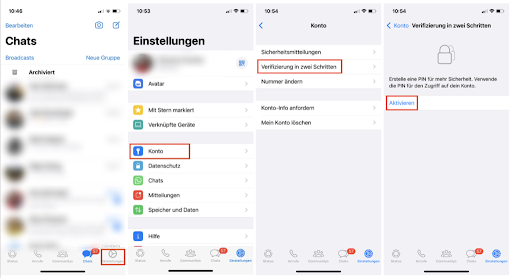
Use two-step verification.Two-factor authentication (2FA), which WhatsApp calls two-step verification, adds an extra layer of protection to your account. It’s also easy to turn it on in your settings by tapping the You icon and then going to Account. Set a six-digit PIN there, which you’ll need to enter when logging in on a new device or after reinstalling WhatsApp. Also enter your email address so you can reset your PIN if you forget it.

Create a passkey for your WhatsApp account.
Passkeys are a relatively new way to authenticate yourself. They replace passwords and text-message verification codes with cryptographic keys, helping improve your protection from log-in based phishing attacks. To log in to WhatsApp on a new device or after reinstalling the app, you can use a passkey. This allows you to sign in using your fingerprint, facial recognition, or your device PIN instead of entering a one-time text message code. You can — and should — turn on the option in the app settings under Account. Just make sure your phone has a screen lock turned on, because passkeys depend on the phone’s own authentication measures (like Face ID or a PIN) to work.
Turn on the “App lock” feature.
This feature is located in your WhatsApp settings under Privacy and is designed to protect WhatsApp from unauthorized access when your device is unlocked. If you turn on the app lock feature, you’ll need to verify yourself via fingerprint or facial recognition when opening WhatsApp. With Avira Antivirus Security for Android, you can also lock other sensitive apps with a PIN, hiding their contents from prying eyes.
Never link your WhatsApp account to unofficial apps.
It can be risky linking your device to unofficial apps or websites (such as GB WhatsApp, FM WhatsApp, WhatsApp Plus, TeleMessage, or TM WhatsApp) as third parties have developed these fake WhatsApp apps and websites.
Linking your account to such an app or website could result in your WhatsApp account being blocked temporarily or even permanently. Worse still, they can compromise your account or contain malware that steals your data. Fake apps, claiming to be from WhatsApp or which look like WhatsApp, are just as dangerous.
Enjoy WhatsApp’s latest security features Make sure you get the latest security features by regularly updating WhatsApp. These are just a few of the safety features that have been added recently:
Passkey-based encryption for backups: You can now also protect your backups with a passkey instead of using a password.
Account protection through registration check: If an attempt is made to move your WhatsApp account to a new device, a message will appear on your existing device to verify this step. If you reject the move, the registration process is canceled on the new device. Thanks to this alert, you can take steps to strengthen your protection — such as by turning on two-step verification.
Malware protection: The Device Verification process runs in the background, protecting you from account takeover (ATO) attacks by performing integrity and authentication checks and blocking unauthorized devices.
Protect your WhatsApp account with Avira Antivirus Security
You can protect your device from spyware and other types of malware using antivirus protection like Avira Antivirus Security for Android, reducing the risk of an attacker snooping on your verification code. You can also upgrade and get a host of additional features, including Web Protection to block malicious websites. Web Protection is also included in the iOS app Avira Mobile Security Pro — plus you can upgrade the free version of the app at any time to enjoy this feature.
WhatsApp is a registered trademark of Meta Platforms, Inc.