Does Instagram rule your screens, feed your FOMO (fear of missing out), and turn a simple breakfast into a photoshoot? While a life without filters might seem unthinkable, more and more people are doing just that. Whether it’s doom scrolling that’s sucking up your time or you’ve had enough of the pressure to curate a picture-perfect life, saying goodbye to Instagram can help you reclaim your digital peace. This handy guide will walk you through what it really means to delete (or deactivate) your account and how to do it the right way. Then, help protect your online security and privacy with Avira Free Security (with a free VPN).
Why some people are going Insta-free
There are many reasons why people choose to cut ties with social media platforms like Instagram. Some are concerned about the security of their data and the potential for misuse. Others feel that the endless stream of information and oh-so-perfect images make them feel burnt out or inadequate. Perhaps you want to replace doom scrolling and quick online connections with more meaningful in-person relationships (that don’t come with endless ads)? After all, being socially connected is vital to our well-being. Mental health experts, like HelpGuide, a non-profit, are concerned about the strong link between heavy social media use and depression, isolation, and cyberbullying, particularly in young people.
You might consider deleting or deactivating your Instagram account an act of self-care! Here’s how to begin your digital detox—and what to consider before you do. Culling your apps is always a good place to start (and here’s how to delete apps on an iPhone).
What to do before deleting your Instagram account
Hold your horses, cowboy. It’s worth giving this some thought. Remember that once you permanently delete your Instagram account, that’s it—it’s gone for good. After your account has been deleted, you’ll no longer have the luxury of accessing Instagram’s data download tool. So, it’s a good idea to download your information first to help ensure that your data (including photos, videos, comments, and likes) doesn’t get scrubbed along with your account. The Instagram Help Centre offers detailed information on how to access and download your information on Instagram. Choose your device from the tabs at the top (Android, iPhone, computer, and mobile browser) and then proceed via the Accounts Centre or your Instagram Settings (the wheel icon).
After you’ve made a download request, it’ll appear as In progress under the Current activity tab in the Download your information tool. You’ll receive an email with a link to download your information—and your data will be available for downloading for four days.
Are you sure you really want to delete your Instagram account? You could temporarily deactivate it to see how you enjoy your Insta break—like a trial separation from a partner. Before you start, make sure you have your login details to hand, including your email address/username and password. You can’t delete/deactivate your account without them. If you’ve lost your password, create a new one by clicking the “Forgotten your password” button on the login page.
To deactivate or delete your Instagram account… that is the question
Should you bid it a permanent farewell or take a holiday? The difference between deleting and deactivating your Instagram account is that once it’s deleted, it’s gone permanently. Deactivating is like putting it in a drawer: It’s invisible to your friends and hidden from anyone searching for it, but you can reactivate it when you choose, and your data (including your profile, likes, photos, followers, etc.) will have been preserved. You won’t receive notifications while your account is deactivated, so you can cultivate that digital tranquillity you were after. Instagram doesn’t impose a time limit on how long you can keep your account disabled , and you can reactivate it whenever you’re ready—just log in!
If you choose to delete your account, Instagram provides a 30-day grace period during which you can reactivate it if you change your mind (so don’t panic!). Your account won’t be visible to others during this time. Remember that you can now manage many account settings across your Facebook, Instagram, WhatsApp and Meta accounts in one place: the Accounts Centre. It helps provide an integrated experience across your accounts.
Follow these steps to delete your Instagram account.
Follow these steps to deactivate your Instagram account.
Ready? Follow these steps to delete your Instagram account
Choose from the devices and methods below, and you’ll be a few steps away from an Instagram-free digital existence.
How to delete Instagram on your smartphone (Android or iPhone)
- Go to Account Profile (your profile picture on the bottom right) > Settings and activity (the three bars in the top right corner). A new window opens.
- Click on Accounts Centre> Personal details.
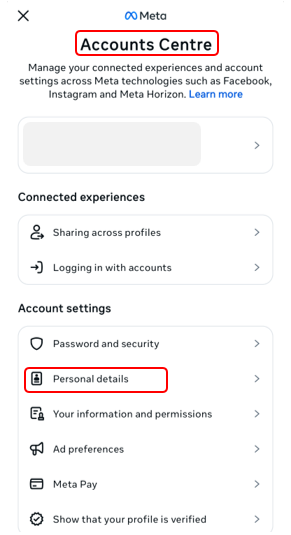
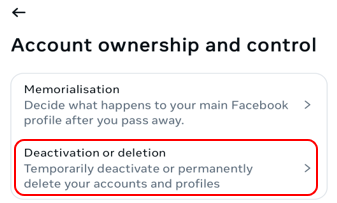
- Select Account ownership and control> Deactivation or deletion.
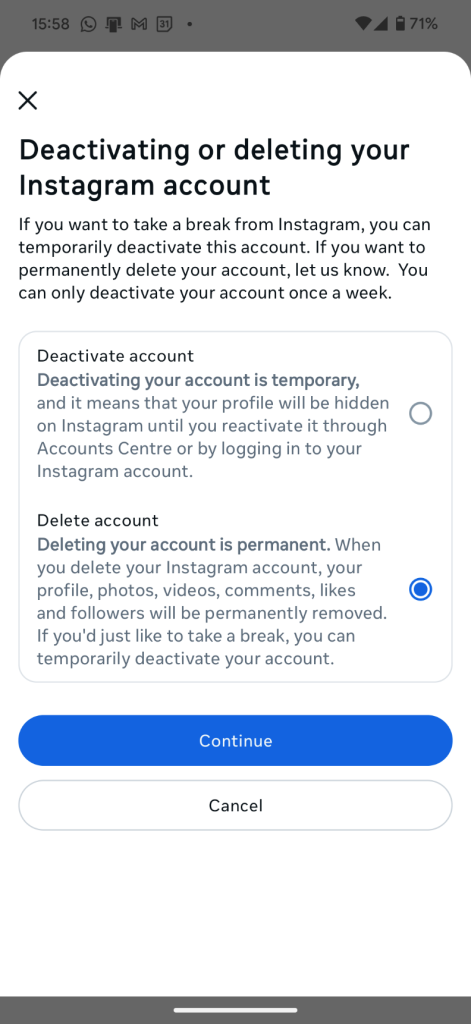
- Select the account you want to remove, choose Delete account,and tap Continue.
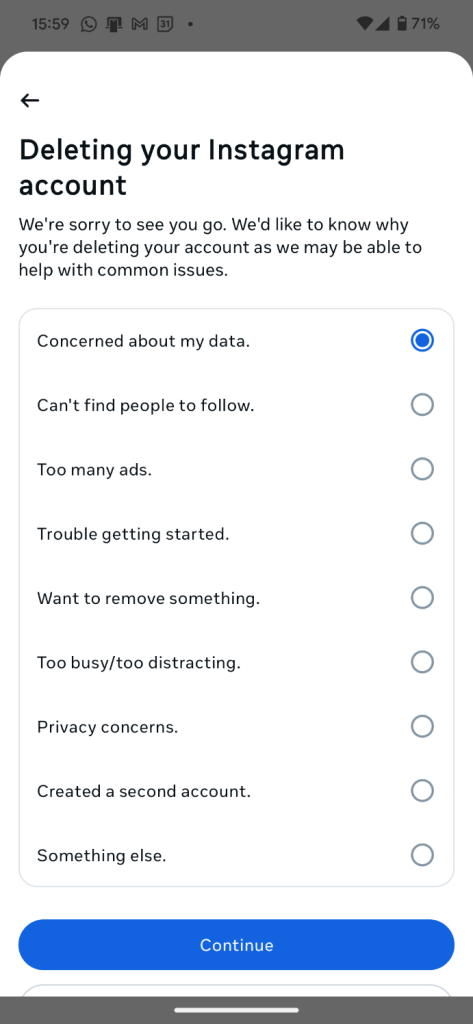
- Choose a reason for leaving and tap Continue. You’ll then need to sign in again with your password to confirm you want to delete your Instagram account permanently.
How to delete Instagram on your desktop PC or Mac
Deleting your Instagram account is the same whether you use a PC or Mac .
- Log into your Instagram account.
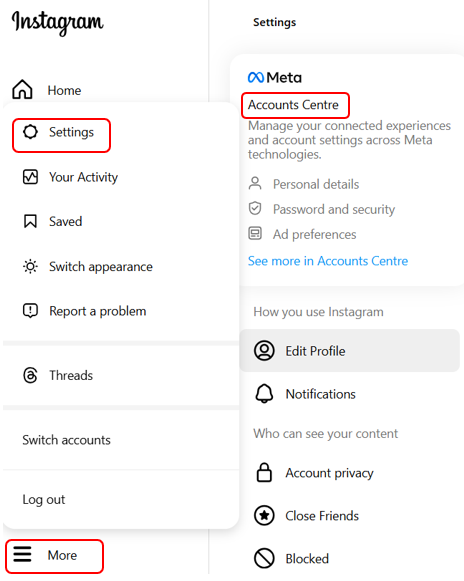
- Go to More> Settings > Accounts Centre.
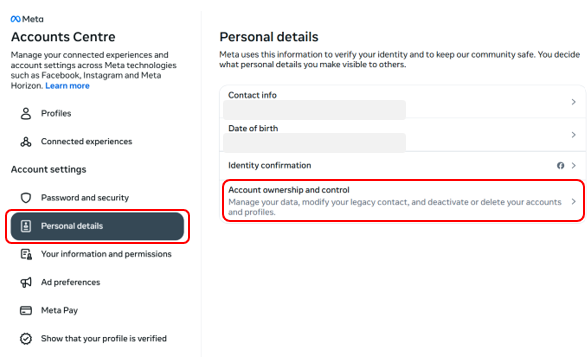
- Select Personal details> Account ownership and control.
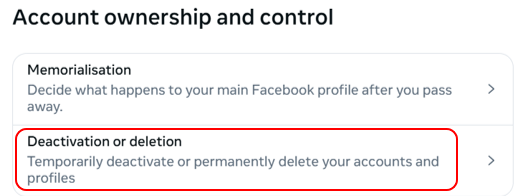
- Choose Deactivation or deletion.
- Select the account you want to delete. Click the button next to Delete accountand then click Continue. Enter your password to verify your identity.
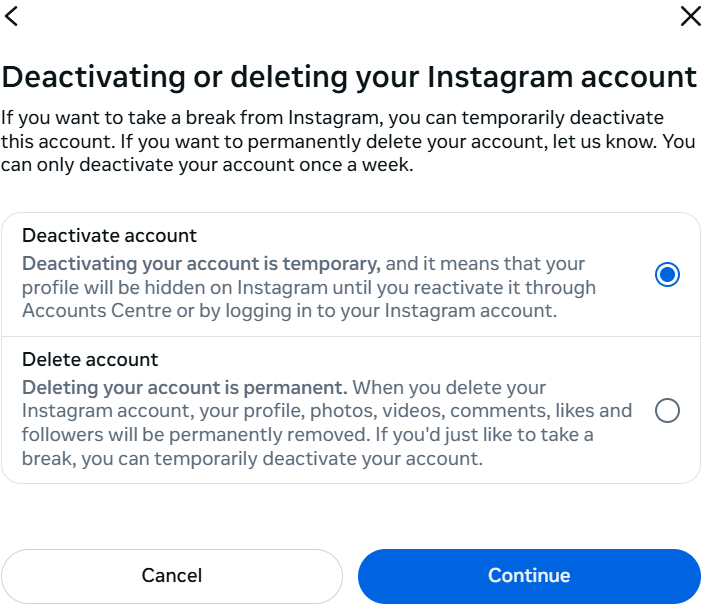
- Enter your Instagram password. If you’re using login details from your Facebook account to access your Instagram, you’ll be prompted to create a password for your Instagram account. A one-time code will be sent to your registered email address. Enter this into the box when prompted and click Continue. Then, create an Instagram password.
- Choose a reason for deleting your account from the list provided and clickContinue.
- Depending on your selected reason, you may see a window offering more information on the topic (e.g., privacy) to address your concerns. Click Continue and then click Delete accountto confirm.
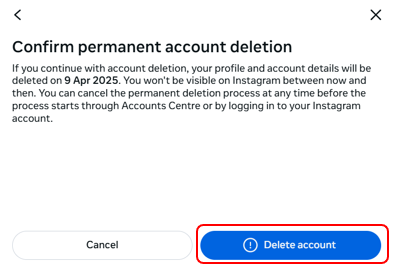
Why stop at Instagram? For a more comprehensive digital clear-out, follow our guides on how to delete your Twitter account and delete your Snapchat.
How to deactivate your Instagram account
Remember that deactivation will hide your account, but your data won’t be deleted. To reactivate your account, simply log in—that’s it!
How to deactivate Instagram on a PC or Mac
- Log into your Instagram account.
- Go to More> Settings > Accounts Centre.
- Select Personal details> Account ownership and control.
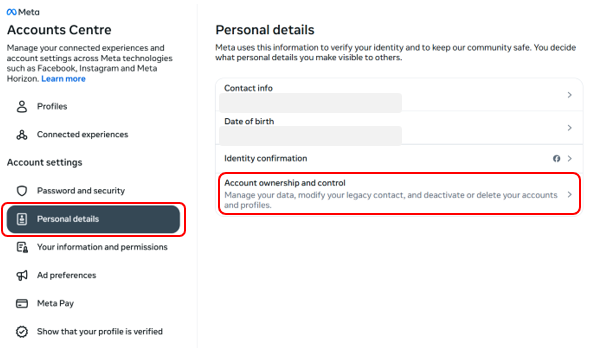
- Choose Deactivation or deletion in the pop-up.
- Select the account you want to deactivate. Click the button next to Deactivate accountand then click Continue.
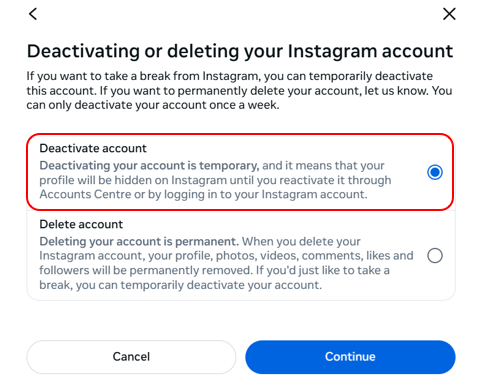
- Enter your Instagram password. If you’re using login details from your Facebook account to access your Instagram, you’ll be prompted to create a password for your Instagram account. A one-time code will be sent to your registered email address. Enter this into the box when prompted and click Continue. Then create an Instagram password.
- In the window that opens, choose a reason for deactivating and clickContinue.
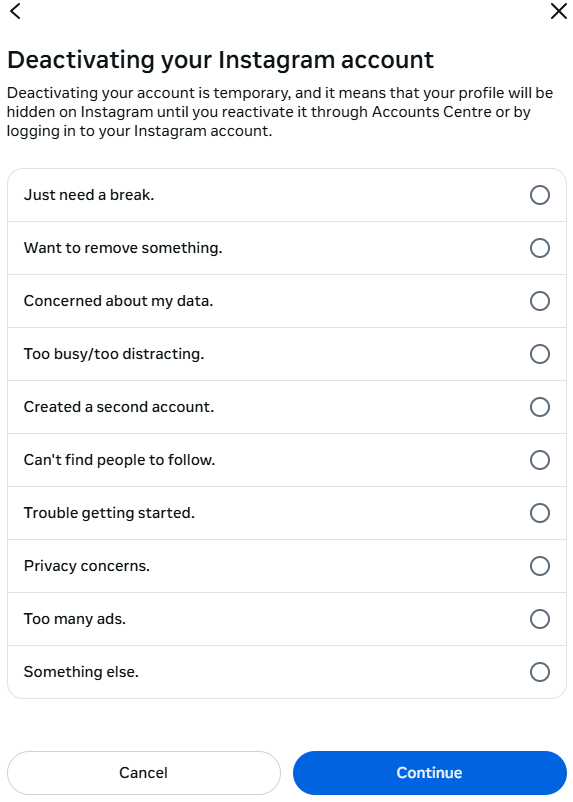
- A pop-up window opens reminding you that deactivating your account is temporary. Click Deactivate account to proceed.
How to deactivate Instagram on an Android or iPhone
Go to Account Profile (your profile picture on the bottom right) > Settings and activity (the three bars in the top right corner) > Accounts Centre.
Now follow the same steps as for a PC or Mac above, starting at step 3.
Changed your mind? How to reactivate your Instagram account
Are you missing those silly dance videos of goats, or perhaps you want a visual record of your life that you can store in the cloud and look back on later? Some people choose to return to the social media fold because they miss being actively involved in the daily lives of friends and family (as long as they can remind themselves that what they see isn’t an accurate representation!).
To reactivate your Instagram account, sign back in using the mobile app or the website. If you decide to delete your account, log back in within the 30-day deactivation period, or you won’t be able to restore it. When you reactivate your Instagram account, you’ll see that nothing has changed—it’s just as you left it. If anything unexpectedly ever changes, your Instagram account might have been hacked. No online account is immune to hackers, so keep an eye on any account activity, and always use a strong, unique password for all your online accounts.
Stay safer from online threats and help protect your privacy
Who’s watching, why, and what are they doing with your data? Carefully using (or deleting) social media won’t mean an end to your online privacy concerns. From the minute you dive into the web, you’re relentlessly tracked, particularly by e-commerce sites and marketers, who use a range of web-tracking tools, like tracking cookies (See our ultimate guide on how to clear cookies). While a VPN can’t make you entirely anonymous, it’s a helpful privacy tool. By encrypting and routing your traffic through a VPN server, your ISP (internet service provider) can’t see what websites you visit or what files you download. A VPN also helps mask your computer’s unique IP address. And it’s a good idea to adjust your browser settings to block third-party cookies. Consider a browser built for greater online security—Avira Secure Browser helps block ads, trackers, and dangerous websites.
Ultimately, we need multi-layered defences against online threats and hackers. That’s why Avira Free Security blends powerful antivirus, a password manager, a software updater, a VPN, and more. Help protect all your devices with Free Security for Windows, the security solution for Mac, the security app for iOS devices, or the antivirus app for Android phones and tablets.
Instagram is a trademark of Instagram LLC.