
Is TikTok your digital haven, where creativity thrives, trends explode overnight, and the algorithm somehow knows you better than your best friend? But the fun and speedy connections come with the inevitable downside that social media users know too well: trolls, spammers, and those energy-draining “friends” and influencers you wish you didn’t know. Could the block button be your best friend? Learn how to wield it deftly with this quick step-by-step guide to keeping TikTok a digital destination that makes you happy. And for even greater peace of mind, stay safer online with essential protection and privacy tools from Avira Free Security.
Why block someone on TikTok?
Whether it’s an aggressive keyboard warrior who insists on commenting “mid” under every video you post, a spam account flooding your DMs with dodgy pyramid schemes, or that strange friend from school who won’t stop lurking… sometimes it’s time to cut the digital cord. Blocking someone isn’t petty or dramatic—you have every right to carefully curate your personal corner of the internet and prune away content and contacts that don’t bring you joy. Think of it as an act of self-care.
For more information on problematic content, see the TikTok guide to Safety and Civility. And here are some of the reasons you might choose to block someone.
- Unwanted attention: Is someone making you uncomfortable by constantly viewing your content or messaging you excessively? You could be a victim of cyberstalking. Don’t feel you have to put up with it. Like many online spaces designed to connect people, young users are at risk of online grooming by predators.
- Harassment or bullying: Like any social media platform, TikTok is a breeding ground for These tormentors hide behind their anonymity to threaten, humiliate, or doxx others. Cut the ties, and don’t give them the space they need to intimidate you.
- Fake accounts and spam: Scammers create fake accounts that imitate real celebrities or influencers to scam their followers. Be wary of expensive giveaways and fake contests—if it sounds too good to be true, it usually is, so you probably haven’t won that beach house. Research a celebrity’s real account, and never enter your personal details on random web pages. Treat all online interactions as possible phishing Cybercriminals are masters of deception and also engage in smishing, catfishing, and quishing.
- Inappropriate or offensive comments or messages: Is it derogatory, demeaning, rude, or shocking to you, your community, or religion? Typical examples include hate speech, sexually explicit material, and content that promotes violence or endangers minors. No one has the right to unchecked free speech on your digital space—block it!
- Hurtful or damaging content: From picture-perfect lives to fake news and toxic influencers who glamorise stick-thin good looks, social media can be harmful to our mental health and self-esteem. Create a safe and supportive space for yourself online by removing those who only make you feel worse.
Remember that you can block any TikTok user, whether they’re your follower or not. Also, they won’t know you blocked them because TikTok won’t notify them.
How to block someone on TikTok (one person at a time)
If negativity is limiting your enjoyment of TikTok, remind yourself that it’s meant to be a positive, inspiring, and fun space. If someone is taking any of that away, go ahead and block them (guilt-free!). Choose your device below to get started.
How to block someone on TikTok using an iPhone or Android
- Open the TikTok app and find the user you want to block. Use the search bar to find their profile. Tap the share (arrow) icon in the top right corner of their profile page.
- Click Block.
- Tap Block again to confirm your selection. They’re now blocked!
How to block someone on the TikTok website
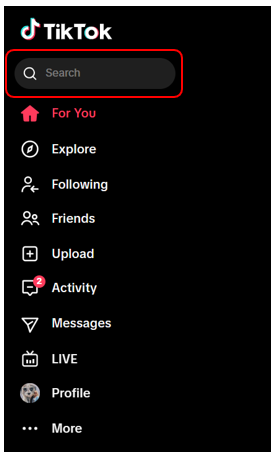
- Open the TikTok website. Use the search bar to find the user you want to block.
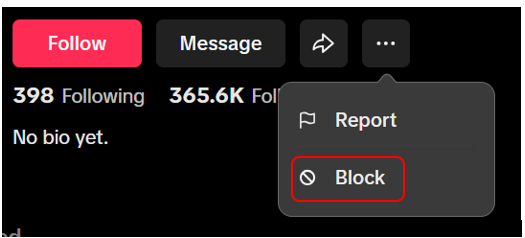
- On their profile page, click the three dots (under their name and next to the arrow icon).
- Click Block.
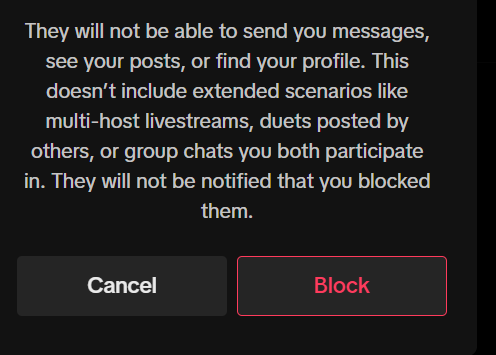
- Tap Block again to confirm your selection. You’re done!


How to block multiple users at once
If you want to block multiple people at once, searching for their individual profiles is time-consuming. Thankfully, you can sever your ties with a batch of accounts at once without viewing the profiles. Note that you can bulk block up to 100 people this way—but you can only use this feature for those who comment on your videos. You can’t block a group of users commenting on another video (however much they’re annoying you).
- Open one of your TikTok videos and click on the Comments icon on the right-hand side of the screen.
- Press and hold on a comment. Then, choose Manage multiple comments.
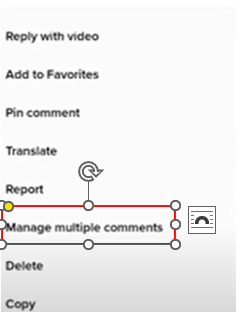
- Select the comments from the accounts you want to block and tap More.
- Click Block accounts.
- Tap Block again to confirm your selection. You’ve banished these users from your digital garden of “peace”.

Do you want to block just one person’s account? Long press on their comment under your post. Then click on Manage multiple comments, but choose just the comment from that user. Tap More and then Block accounts.
What happens after you block someone on TikTok?
What can they see and do? What can’t they? Let’s look. After you’ve blocked someone on TikTok, they can no longer view your profile or any videos and stories you post. They can’t send you direct messages, comment on your videos, or react to your content with duets or stitches either. If the user you blocked was following you, they’ll be removed from your followers list (and you’ll be removed from theirs). They also won’t be able to find your account by searching for your profile on the app.
How to unblock someone on TikTok
Perhaps you made a mistake, changed your mind, missed them, or they apologised? No problem. There are two quick and simple ways to unblock someone on TikTok.
Unblocking option 1: Go directly to the user’s profile, click the share (arrow) icon or the three dots, and tap Unblock.
Unblocking option 2: Go to Settings and privacy > Privacy > Blocked accounts and unblock them from your Blocked list.
Whichever option you choose, you’ll immediately see their content again and they’ll be able to see and interact with you as normal.
Explore the alternatives to blocking on TikTok
If blocking someone entirely on TikTok seems a little heavy-handed, there are gentler alternatives that will allow you to dictate how others interact with you. You can also customise what you see so you’re less likely to be shown upsetting or unenjoyable content in the first place. There are many tools at your disposal:
- Muting: This hides a user’s posts from your feed. They’re still there, but it’s like they’re wearing a cloak of invisibility. They also won’t be able to comment on your videos or message you. Plenty of videos discuss muting a friend on TikTok without unfollowing.
- Restricting who can comment on your videos: In your TikTok account privacy settings, you can choose who can respond to your posts. The options are: everyone (anyone can comment, provided you have comments turned on); your followers (for private accounts only); followers that follow you back (only your friends can respond); no one (all comments are disabled for all your existing videos).
- Turning comments on or off for each of your videos: You can do this before or after you post a video. Find out more about comments on TikTok, including how to turn them on and off.
- Setting your account to private: This allows you to control who can follow you, limiting your exposure to unwanted users. (See our section on “Managing your privacy on TikTok”).
- Using Restricted Mode: This feature filters out content you may not enjoy or find appropriate. Find out how to use Restricted Mode on TikTok. Parents and guardians can also manage Restricted Mode for their teens through Family Pairing
- Filtering content by keywords: You can filter TikTok content by keywords to help restrict certain words and phrases.
Help manage your privacy on TikTok
You can choose between a private or public account, so know the differences. If you opt for a private account, you get to approve the people who can follow you, and they’re free to watch your videos, bios, and likes. You also allow them to see your followers. If your account is public, your posts are visible to anyone on or off TikTok, and they can share your content, too—they don’t even need a TikTok account. Your content is a public playground.
Here’s how to set your TikTok account to private or public:
- In the TikTok app, tap Profileat the bottom.
- Tap the Menu ☰ button at the top. Then select Settings and privacy.
- Tap Privacy.
- Turn Private account on or off.
The TikTok Privacy Centre is packed with information about the privacy features at your disposal.
Report harmful content on TikTok
Blocking users who post harmful or inappropriate content helps protect you, but what about others? And how safe is TikTok? You can play a role in helping maintain a safer environment for everyone by being proactive: Before you block them, report users violating the platform’s standards with hate speech, misinformation, or other harmful content. The updated TikTok Community Guidelines highlight the importance of flagging these posts to the TikTok moderation team so they can respond. Flagged accounts may face restrictions, like being removed from the “For You” feed, so it’s more difficult for their content to gain traction.
In April 2024, TikTok introduced its Account Check feature. This indicates if a user’s access to certain features (like comments or direct messaging) has been restricted due to violations. Creators can also see if their content has been removed for breaking the rules. This is in addition to the existing Account status tool, which lists a creator’s video violations.
TikTok wants its community to be able to create and share safely and without unwanted attention, scams, and spam. Please help their efforts by staying alert, using the privacy tools at your disposal, and never letting violations slip by.
Beyond TikTok: Choose multiple layers of security for all your devices
The block button and other TikTok privacy tools help you maintain a positive space filled with the personalised content you want to see. Sadly, there’s no quick single button to block all the online threats and hackers possibly lurking behind every click. Comprehensive online security and privacy tools are essential to keep your devices, data, and digital identity safer. That’s why Avira Free Security blends powerful antivirus, a password manager, a software updater, a VPN, and more. Choose from Free Security for Windows, the security solution for Mac, the security app for iOS devices, or the antivirus app for Android phones and tablets.
Tik Tok is a trademark of TikTok Ltd.