In recent years, cyber-attacks have become more and more intelligent, but the antivirus industry is fighting back. Regardless our efforts – in the end the user is the one to decide if an app or program that he’s using is harmful and should be blocked or not. The ‘Advanced Security’ feature in Avira Antivirus for Windows offers this very option: it allows you to add exceptions for files you consider safe.
Enabling the ‘Add exceptions’ feature is really simple:
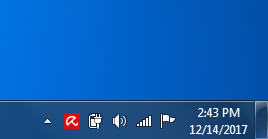
- Click the Avira umbrella icon on the right side of the task bar. Your Antivirus product will open.
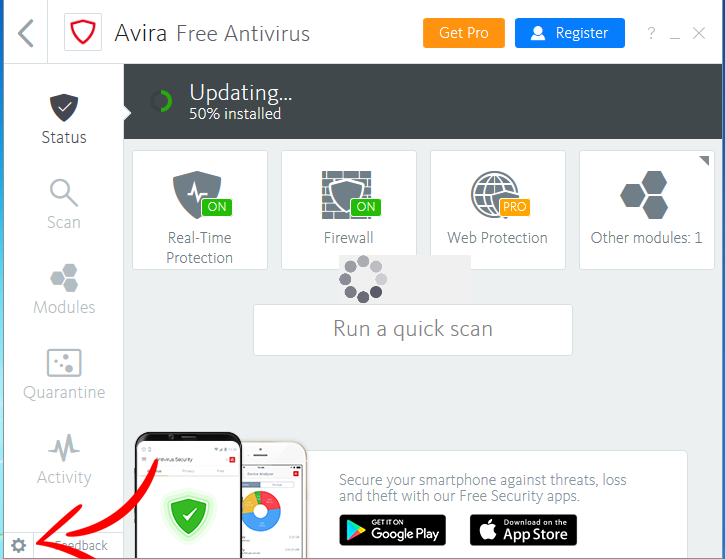
- Click the cogwheel in the bottom left corner of your Antivirus product. The configuration menu will open.
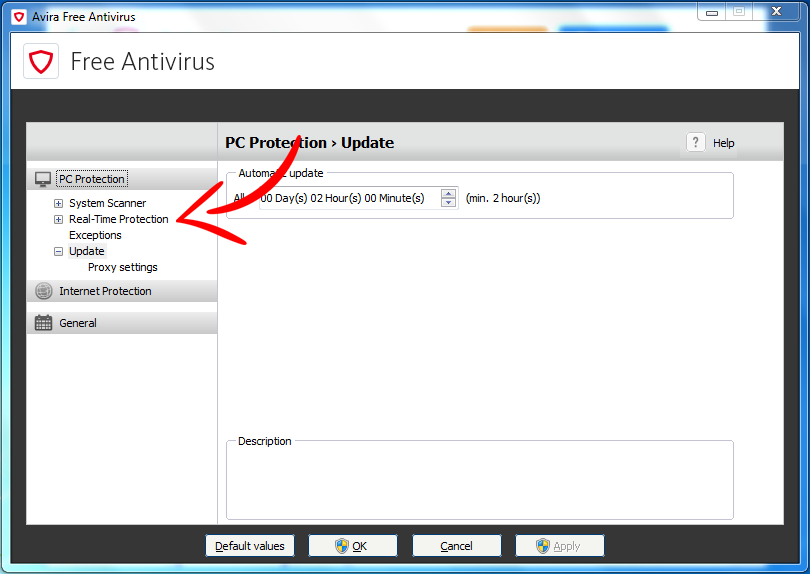
- Select PC Protection > Real-Time Protection > Exceptions.
- Enter the processes or files and folders you want to be ignored from the scanning process, or browse for your exceptions.
- Click Add to move your selection to the exception window.
- Click Apply and then OK to confirm the changes. The configuration menu will be closed.
After making this change in your Avira Antivirus for Windows, you can make Avira fit your individual needs. Make sure that you know what you’re doing though – adding an exception for a potentially harmful program can be dangerous for your computer and your privacy.







bereits der erste Schritt ist nicht möglich, wenn es ein Update bei Windows gibt. Ich verwende Windows 10 home 64 bit. Weder über Windows Defender Cecurity Center, das Icon auf dem Desktop oder in der Taskleiste lässt Avira öffnen. Ich muss Avira immer wieder neu komplett installieren.
Jan is right – adding exceptions for the realtime scanner doesn’t work for some files. I had to uninstall Avira because of this.
i also had to uninstall because i know Frostwire is a safe site but Ariva will not let it download and install no matter what they say
Hi HK,
We’re sorry that something didn’t work as intended. You can submit files which Avira Antivirus has flagged as malicious or suspicious on our website at any time. It’ll then be reviewed and if the files isn’t malicious it will be flagged appropriately. Follow this link to upload the file and choose “Suspected False Positive”.
Best,
István
I have a Mac and the steps don’t look the same. I am trying to ensure that the virus is not interfering with my game. I uninstalled Avira and I had no problems with my game. WOW game master gave me this link but I need it for my Mac IOS. Thank you!
Hi James,
Please try the steps provided in our knowledgebase article. Let us know if that worked for you! 🙂
Best,
István
Well I added files to exception list and scanner constantly pop-up quarantine alert. Here You have link to photo showing exception list: https://imgur.com/BEQ1GyO
I don’t want to change AV but if it won’t help I will have to because it start to annoy me.
The above steps seem to be for an outdated version of Avira. Please provide a link that will work for the current version of Avira. Thanks.
Hi Elcaset,
Avira Antivirus received a new interface and therefore many things changed. Here we go with the new steps:
Hope this helps! If you’ve any further question please let us know.
Best,
István
nope, this doesn’t work.
false positive still blocked.
Hi Spon,
If you think a file might be a false positive don’t hesitate to upload it on our website. Our dev team will check this file and mark it appropriately. Please checkmark “Suspected False Positive (Not Malware)”. Did you mark the file in the system scanner exceptions and real time protection exceptions?
Best,
István
Yeah this doesn’t work at all white list items under system scan and real-time the second after I hit apply back into quarantine it goes.
Hi JR,
What exactly doesn’t work for you? Do you receive any error message? In case you’re using the Pro version please do not hesitate to contact our Customer Service team.
Best,
István
It does not work. I put Advanced system care .exe files to Exceptions and Avira clear them anyway. Due to iObit Advanced systen care is not possible run on PC.
Hi Jan,
Please follow these steps to add your exceptions: https://blog.avira.com/exceptions-avira-antivirus-3-steps/
Please also note: For the Real-Time Protection you’ve to set the exceptions separately.
Best,
István