Need a little break from Facebook or do you want to turn your back on the platform and never return? Read on to learn how to delete your Facebook account for good or just deactivate it temporarily. Also discover what the differences are and what you should consider before deleting your Facebook account. You’ll also find out how Avira Free Security can help you strengthen the protection of (not only) your Facebook account — if you ultimately decide to keep it.
Whether it’s for a digital detox, privacy concerns, fake news, or social pressure — there are many reasons to say goodbye to Facebook, be it temporarily or permanently. And even though nobody likes to think about it, planning for what happens to your account after you pass away is also a key consideration. Before we look at how to delete your Facebook account for good or just deactivate it temporarily, we’ll first examine the differences and what you should consider before deleting your Facebook account.
Deleting and deactivating a Facebook account — the differences
The main difference is that deactivating your Facebook account only suspends it temporarily, whereas deleting it removes it completely and permanently — including all associated posts, comments, photos, videos, friend lists, etc. Since your account is only deleted 30 days after you submit your request, you still have a grace period after starting the process. If you log back in to Facebook during that time, the process is canceled. However, once the deadline has passed, all data and content will be irretrievably lost and you won’t be able to reactivate or restore your Facebook account.
As such, think carefully about what you want to do. If you delete your Facebook account, you’ll no longer be able to use Facebook Messenger and access the contacts and messages stored there. You’ll also lose access to all the other apps that you’ve registered with using your Facebook account.
When deactivating, though, nothing will be deleted and you can reactivate your Facebook account at any time. Once deactivated, your name and photos will be removed from most shared content. Other users will no longer be able to access your profile, see your timeline, or find you via search. The same applies to pages you manage. You can still use Facebook Messenger via the mobile app or messenger.com unless you’ve deactivated it separately. Be aware that you’ll only be able to deactivate your Messenger account if you’ve already deactivated your Facebook account.
Whether you delete or deactivate your account, some content, such as direct messages you have sent to other users, will remain visible to them. In both cases, you’ll no longer receive notifications from Facebook, such as friend requests.
Key considerations to bear in mind before deleting your Facebook account
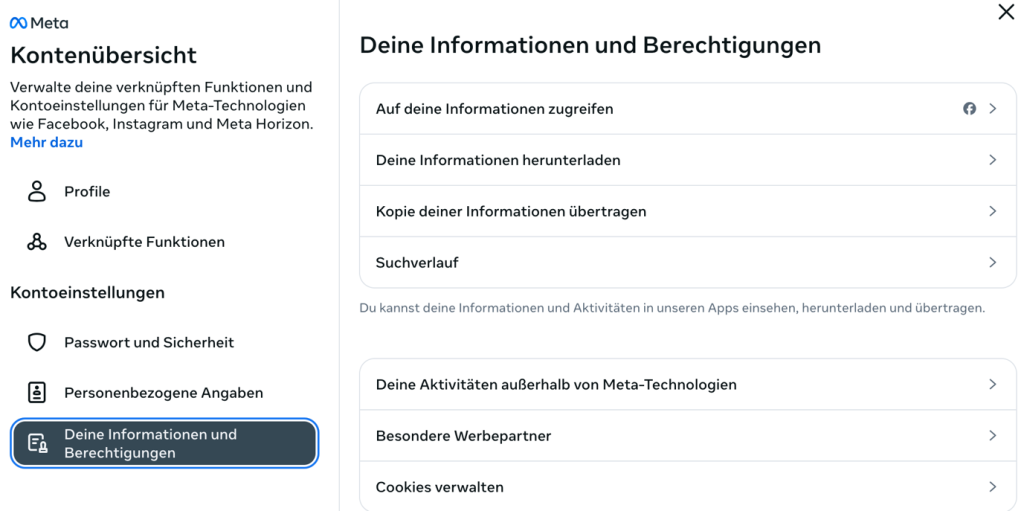
Some of you will have been using Facebook for quite a while, so many memories will have accumulated on the platform. If you don’t want to lose them, you can back them up before deleting your Facebook account. Facebook offers you this opportunity both in the account overview in the Account Center after clicking Your information and permissions as well as during the deletion process.
There you can download your Facebook information and/or transfer a copy of the information to another service. You can also choose whether you want to download all available information or only certain types of information (such as images, messages, or data logs).
Also note that deleting or deactivating your Facebook account will also delete or deactivate all the profiles that this account manages. Your Facebook account is your main profile and must be active to use additional profiles for different interests or groups. You can also deactivate or delete these additional profiles independently of each other and from your main profile.
Check out our article on your options if you suspect your Facebook account has been hacked and you want to delete it.
Here’s how to deactivate or delete your Facebook account via your browser
- Log in to Facebook and click your profile picture on the top right.
- Select Settings & privacy and then click Settings.
- On the left-hand side of the page, click Meta Accounts Center.
- On the left under Account settings, click Personal details.
- On the right, click Account ownership and control.
- Click Deactivation or deletion.
- Choose your main profile.
- Now choose between these two options: Deactivate account or Delete account.
- Click Continue and follow the instructions.
How to arrange deletion in the event of your passing
On Facebook, you can either designate a legacy contact to manage your Facebook account in the event of your passing or specify that it be deleted permanently. To do this, follow these steps.
- Log in to Facebook and click your profile picture on the top right.
- Select Settings & privacy and then click Settings.
- On the left-hand side of the page, click Meta Accounts Center.
- On the left under Account settings, click Personal details.
- On the right, click Account ownership and control.
- Click
- Choose your main profile.
- Click Delete after death, click Next, and follow the instructions.
Tip: Take a moment to read our article on the topic of taking care of your digital legacy where you can learn more about this important topic.
Here’s how to deactivate or delete your Facebook account via the smartphone app
Check out our article on how to delete apps on your iPhone if you want to learn how to remove the Facebook app from your iPhone. If you want to delete your Facebook account on your smartphone, follow these steps:
- Tap the menu icon in the Facebook app (the three horizontal lines). On iPhones, this is located on the bottom right. On Android phones, it’s located on the top right.
- Tap Settings & Privacy and then Settings.
- Tap Meta Accounts Center.
- Tap Personal details.
- Tap Account ownership and control.
- Tap Deactivation or deletion.
- Choose your main profile.
- Now choose between these two options: Deactivate account or Delete account.
- Tap Continue and follow the instructions.
How to strengthen the protection of your Facebook account
According to a current study by one of our cybersecurity experts, Facebook is the most frequently used platform for scams, accounting for 56% of all identified threats on social media. The four most commonly used scams include dangerous ads, fake shops, Phishing attacks, and financial scams.
Whether you want to keep your Facebook account or deactivate or delete it — we recommend using an all-in-one solution like Avira Free Security to protect yourself from cyberthreats. That’s because Facebook isn’t the only place where dangers lurk.
In addition to powerful antivirus protection, Avira Free Security includes Avira Browser Safety to block malicious ads and websites. It also includes a built-in password manager to create strong passwords for your online accounts, enabling you to strengthen their protection. Whenever possible, be sure to also use two-factor authentication (2FA) to further protect your accounts against unauthorized access.
Facebook is a trademark of Meta Platforms, Inc.